Most guides to how to send bulk messages answer for WhatsApp and then swap the app name. That fails here, because the feature they describe does not exist on Telegram. WhatsApp has broadcast lists. Telegram has channels, groups, a forward sheet that takes several chats, and bots, and each of them reaches a different set of people.
We sell desktop software that sends messages from many accounts, so this page has an interest in the last option. It starts with the free ones anyway, because for most people they are the right answer, and it says plainly where each one stops.
Can you send one message to all contacts on Telegram?
Not in one step. Anyone working out how to send a message to all contacts on Telegram finds no "all contacts" target in the share sheet, no saved recipient list and no broadcast mode for a personal account. Searches for telegram send message to all contacts, send message to all contacts telegram, how to send message to all Telegram contacts, or how to send a message to all Telegram contacts end in the same place: one of the workarounds below.
The closest thing is the forward sheet. In Telegram's Android and desktop apps you can select several chats in it and send once, and every selected chat gets its own copy. This is how to send message to multiple contacts in telegram without any tool, and the honest answer to how to send one message to all contacts in telegram when the list is short. No maximum for the selection is documented. In practice the limit is patience, because you tick each chat by hand.
The second route is a group. You put the people in one place and post once. Everyone is reached, but the relationship changes: they are now members, they can see each other, and they can leave. Putting your whole contact list into one group explains what the app lets you add and what each person's privacy settings block.
Forward one message to several chats
This is the method behind the search telegram forward message to multiple users, and it works the same for a private chat, a group or a channel post:
- Write the message once, in Saved Messages or in any chat you can post in.
- Press and hold it on mobile, or right-click it on Telegram Desktop, and choose Forward.
- Select several chats. On Android a long press on a chat starts a multi-selection, and on desktop you tick them. Not every client offers it, so check the app you use.
- Add a comment if you want one, and turn on the option to hide the sender's name, so it arrives as a fresh message rather than a forward from Saved Messages.
- Send. Each chat receives a separate message, and replies come back one chat at a time.
That covers telegram send message to multiple users for a handful of people. Past a few dozen, the manual selection becomes the bottleneck, and a long contact list is usually an outdated one. Clearing stale entries out of your contacts first saves you forwarding to numbers that left years ago.
Which method reaches which audience?
The method decides who receives the message, whether they asked to, and what Telegram allows. Figures below come from Telegram's own pages where they exist. Where nothing is published, the table says so.
| Method | Who receives it | Published limit | Cost |
|---|---|---|---|
| Forward to several chats | Chats you select by hand | None published | Free |
| Channel post | Everyone subscribed | Unlimited subscribers | Free |
| Group message | Every member of the group | Up to 200,000 members | Free |
| Bot broadcast | Users who started the bot | About 30 messages a second | Free, plus hosting |
| Multi-account client | A list of usernames or numbers | None published | Paid software, your accounts |
The first four are what Telegram built for reaching many people at once. Channels and bots get a full treatment in our guide to broadcasting through channels and bots, so here only the points that decide a bulk send. A channel is one-way and its subscribers chose to be there. A bot that formats channel posts with buttons makes those posts look finished, and none of it touches a private inbox.
Why a bot only half works for private messages
Telegram's Bot FAQ is plain: a bot cannot start a conversation with a user. People have to message it first or add it to a group. Once they have, the same FAQ gives the only rate figures Telegram prints: roughly 30 messages a second for bulk notifications, about one a second into a single chat, and 20 a minute in a group. Bots with paid broadcasts enabled in @BotFather can go up to 1,000 a second. For a list that opted in, a bot is the cleanest telegram bulk messaging setup there is. For a list that never heard of you, it sends nothing. A channel or group built this way may later need a new owner, and moving channel ownership between accounts covers what Telegram checks first.
How to send message to all group members in Telegram
Posting in the group is the answer the app intends. Every member sees it. When an admin pins it, Telegram offers to notify all members, which is the nearest thing to an @all mention, and the pin stays on top for people who join later. The opposite exists too: a message can go out silently, so nobody's phone buzzes. For an admin asking how to send message to all group members in telegram, that is the whole procedure, and it needs no tool.
A private message to every member is a different request. It sits behind searches such as send message to all group members telegram, telegram send message to all members and how to send bulk messages to telegram group members. No button does it. You would read the member list, then write to each person from an account that is not their contact. Large groups can hide their member list, and privacy settings decide whether a stranger may write at all. The Telegram FAQ notes that some users charge a fee in Stars for messages from people outside their contacts.
Sharing a group is not consent to private messages. Members joined for the group's topic, and a private pitch from a stranger is the message most often reported. The usual path runs the other way: bring people into one place where your post reaches them. Adding members to a group in large numbers sets out the add limits, and what an auto-join bot runs into covers the opposite direction, accounts joining groups instead of people being added. A single person is simpler: saving one person as a contact takes a username or a number and a few taps.
How to send bulk messages for free, and where free runs out
Every native method above is free. So the honest answer to how to send bulk messages for free is to pick the one that fits the audience: forward to a short list, post in a channel your audience follows, post in a group you run, or build a bot people start themselves. None of it costs money or puts an account at risk, because the people receiving it chose to be there. That is the opposite of SMS, where bulk messaging services bill for every recipient through a paid gateway.
Free stops working when the list is long and the people on it never contacted you. That is what how to send message to everyone on telegram usually means, and no native feature covers it. Free extensions and scripts that promise it are user clients logged into your account, and a script sending from your only account puts that account at risk. Importing a list first? Importing contacts in bulk from a file explains which entries get matched and which are dropped without a word.
The need is phrased many ways: how to send message to all in telegram, how to send message to all contacts on telegram, how to send message to all contacts in telegram, how to send bulk messages in telegram, send bulk message telegram. Behind every version are the mechanics on this page.
What a bulk messaging tool does that the app does not
A telegram mass messaging tool uses no hidden feature. It runs ordinary user accounts through their sessions, takes a list, and sends each target its own message with a pause in between. Our breakdown of what a mass DM bot actually sends explains why the word bot misleads there. The Bot API cannot reach a stranger, so whatever does is a user account.
The Mass DM modules in Telegram Solutions work that way. You load the accounts, give each its own proxy, paste usernames, phone numbers or user IDs, write the message, and set a minimum and maximum delay. A run spreads the list across the selected accounts and skips targets once those accounts are at capacity, instead of pushing more through the same ones.
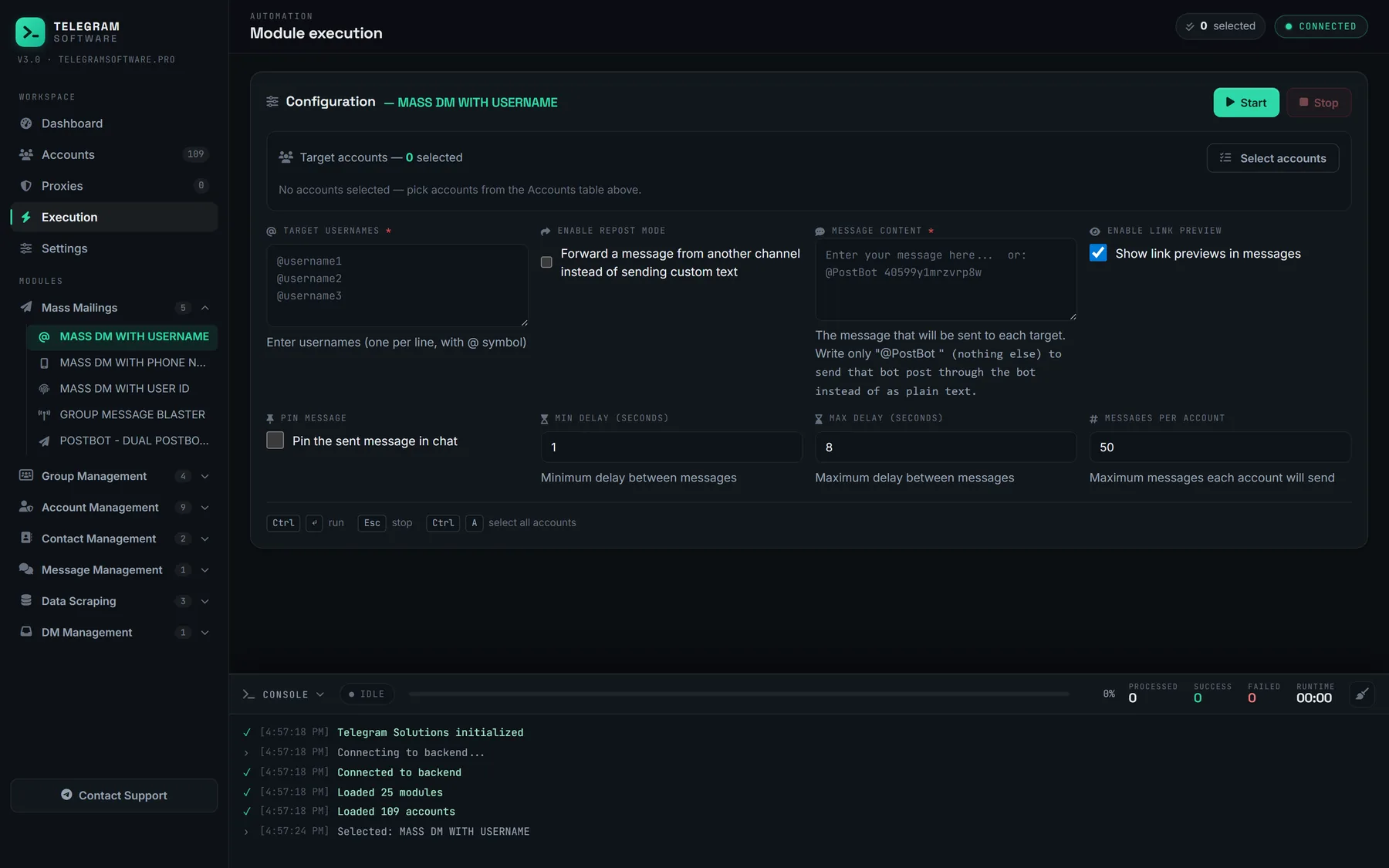
The walkthrough below shows a full run in the panel, from loading sessions to the delivery log.
This is how to send bulk message on telegram at a scale forwarding cannot reach, and it is where most of the risk sits. Each account sends as itself, so a message recipients report counts against that account. Usernames also have to resolve: how username search resolves a handle explains why some entries return nothing.
Accounts, replies and clean-up
Three jobs sit around the send itself. New accounts usually go through ordinary use before any bulk run, and warming up accounts before a first campaign describes what that does and does not change. Replies land in many inboxes at once, which is what one inbox for every account you run is for. Afterwards, wiping sent messages across chats and exiting every group in a single pass reset accounts that should not keep a run's history.
A telegram mass message to people who asked for it, such as customers who opted in or members of your own community, is a normal use of this software. Aimed at a scraped list, the same run is the one that draws reports. Most bulk messages Telegram users complain about come from exactly that second kind of list.
Why do bulk messages get accounts limited?
Because recipients report them, and reports get acted on. The spam FAQ says that when moderators agree reported messages were unwanted, the account is limited temporarily, for a few days or so on a first offence. A limited account can still write to people who have its number saved and reply to anyone who wrote first. Repeat offences bring longer blocks. The terms of service ask users not to send spam or scam users.
Restrictions arrive in a recognisable order. A FLOOD_WAIT_X error tells the account to wait X seconds before repeating an action, and the error documentation treats it as an ordinary response a client should wait out. PEER_FLOOD is the stronger signal. It is not on the public error list, and the Telethon FAQ describes it simply as the account being limited. Beyond it sits the spam limit, which checking an account with @SpamBot shows.
How many bulk messages a day is safe?
Nobody outside Telegram can say, and Telegram does not. Neither the spam FAQ nor the terms publish a number of messages per day, and no error carries one either. Per-day figures quoted for telegram bulk messages come from vendors and forums, and ours are no exception. A guide on how to send bulk messages on Telegram at a fixed safe rate is quoting its own observation as policy.
What can be said is what moves the risk. Messages to people who saved your number, or who wrote to you first, sit outside the spam limit entirely. Messages to strangers who report them are what trigger it. Tools that send bulk Telegram messages can pace a run, but they cannot make a stranger want the message.
No software raises Telegram's limits or keeps an account from being restricted. A tool controls pace, which account sends what, and whether it stops when Telegram says stop. The message and the list remain the operator's choice, and so does the responsibility for both.