If you typed telegram software looking for Telegram itself, the official clients for every platform are listed on Telegram's apps page, and they cost nothing. This page is about the other meaning.
That other meaning wears a lot of names — telegram tool, telegram bulk tool, telegram growth tool, telegram marketing tool, telegram mass messaging software, telegram multi account tool, telegram account automation software, even automation telegram typed back to front — and almost none of them tells you what the program signs in as, which is the one fact that decides what it can do. We build one of these, a Windows suite, so read what follows as an operator's map rather than a neutral survey. The label marketing software alone already covers two products that sign in as different things; this page goes wider.
What counts as a Telegram tool?
Five kinds of program get called telegram tools, and only two of them ever touch your accounts.
The official apps come first: Telegram's phone, desktop and web clients, free, each running a handful of accounts by hand. Second are bots, which are accounts without a phone number, driven through the HTTPS Bot API with a token from @BotFather. Most of the chatbot builders and broadcast platforms that rank for telegram automation are this kind, and so are most telegram automation tools on the first page of results. Third are no-code connectors, the services that drop a message into a chat when a form is submitted or a spreadsheet row changes. They do send automated telegram messages, but they send them through a bot as well, so every bot rule applies to them unchanged.
Fourth are account-based suites. These sign in as ordinary user accounts over MTProto, the same protocol the official apps speak, and then repeat a job across many accounts at once. Fifth are research and export tools, from the chat export built into Telegram Desktop to scrapers that list who sits in a group.
Only the fourth kind is what people usually mean by a telegram automation tool for accounts, and it is the kind we build. The difference is not academic. A bot reaches people who have already started it. An account reaches whatever an account can reach in the app, at whatever pace Telegram tolerates on the day, and Telegram does not publish that pace.
Can a bot send automated Telegram messages to anyone?
No. Telegram's bot introduction puts it in one line: bots can't start conversations with users, and a person has to message the bot or add it to a group first. Everything a bot-based telegram marketing tool does follows from that sentence. It can broadcast to subscribers who pressed Start, answer them, and post in chats where an admin let it in. A forwarding bot sits in the same position, limited to the chats it was added to, and invite bots can only hand out a link that someone else must choose to open.
A list of usernames or phone numbers gives a bot nobody to write to. A raw ID does not help either, since even a signed-in account needs the access hash that travels with a numeric ID before it can address anyone. Accounts get further: one can open a chat with a number nobody saved when that person's privacy setting allows the match.
That is why outreach software signs in as accounts.
None of this makes a bot the wrong choice. For a channel or a support desk it is usually the right one, because the people it writes to opted in by pressing Start, and a bot can then send them updates on a schedule without any account of yours behind it. It simply cannot reach anyone who has not done that.
What an account-based suite automates
The jobs a person would do in the app, repeated across a pool. Our modules sort into six groups, all listed on the module catalogue on our overview page, and every plan includes all of them.
Messaging covers Mass DM by username, phone number or user ID, along with a group message blaster and a sender for PostBot codes. It is the job behind every telegram mass messaging software search, and how a mass DM run actually gets sent matters more than any speed setting. Groups covers joining and leaving in bulk, plus Member Add, which spreads one add list across several accounts; what stops it most often is the other person's privacy setting, which is why most failed adds are not rate limits. Accounts covers Account Warmup, Check Accounts, a SpamBot check, channel ownership transfer, a username claimer and the session-to-TDATA converter. That group is what telegram account automation means in practice: keeping a pool in working order and knowing which sessions are restricted before a run starts, not after it fails.
Contacts, Messages and Data are the quieter groups. Add Contacts and Delete Contacts manage address books, including the deletions that phone sync tends to undo. Delete All DMs clears inboxes, and DM Hub gathers every account's private chats into one control group. Data holds Member Scraper, a group content scraper and a phone number checker, and what a member scraper can actually read is narrower than most scraper sales pages suggest. A single chat you only want to keep needs none of it, since Telegram Desktop's own export already does that job.
A scraped member list is personal data, and messaging the people on it is direct marketing under GDPR, CAN-SPAM and their equivalents. The lawful basis has to come from you. No software supplies one.
One session pool under every module
Every module draws on the same session pool, the same pacing engine and the same live log, which is the difference between a suite and a folder of scripts. The pacing engine applies per-account caps and randomised delays. When Telegram answers with a flood wait, that session backs off while the rest of the pool carries on. Each session can carry its own proxy, and the SOCKS5 or MTProto details every proxy entry asks for match what the official desktop app wants.
Accounts arrive in one of two formats, session + JSON or TDATA, and an offline converter moves them between the two. TDATA is the data folder Telegram Desktop writes for each install, so an account signed in on a desktop can join the pool as it is. Sessions, exports and logs stay on your machine. Nothing is uploaded to us.
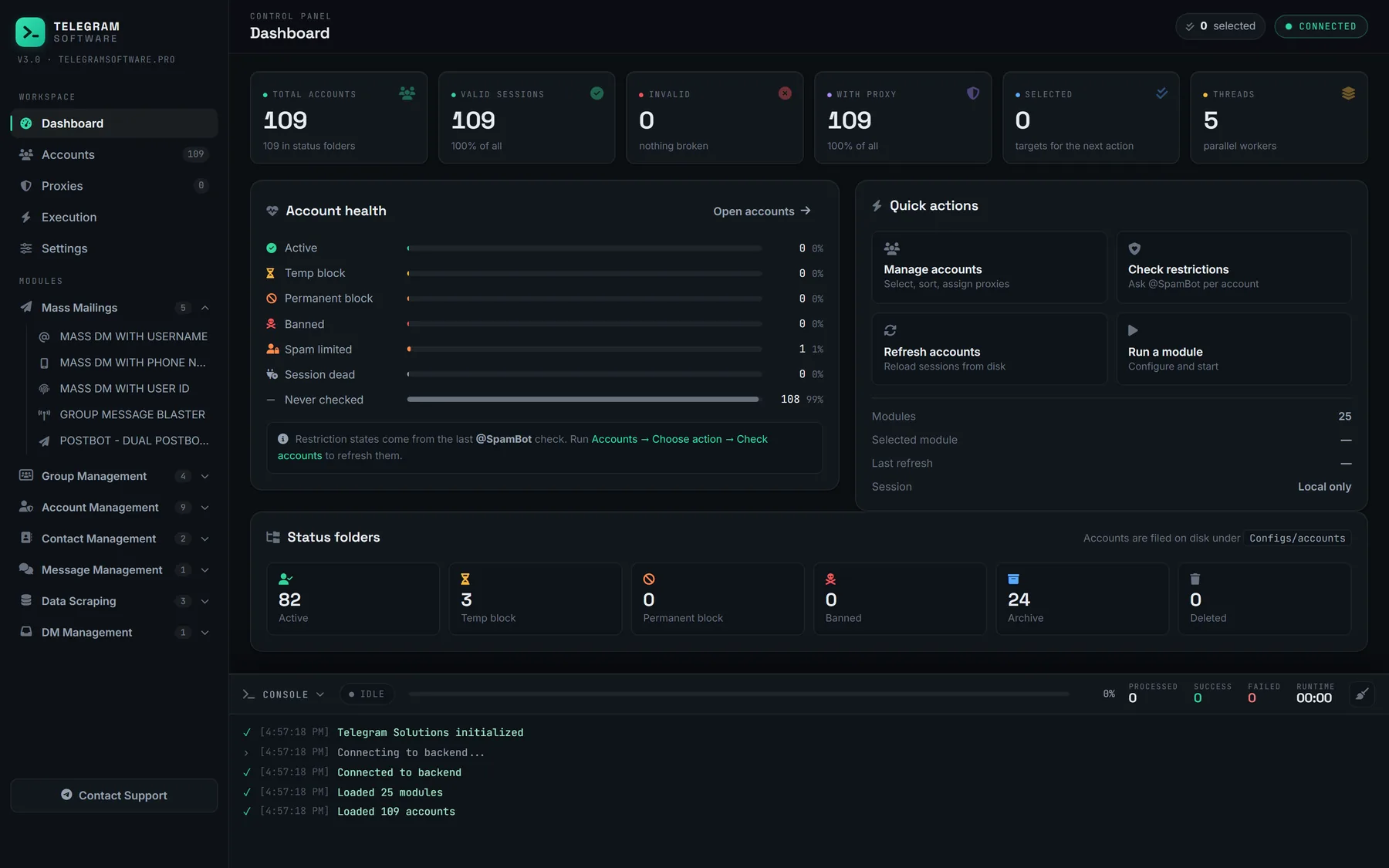
The walkthrough below, published on our YouTube channel in October 2026, steps through the panel one module at a time, from the dashboard to the scraper.
Running a telegram multi account tool inside the rules
Count is not the problem. Telegram's Terms of Service set no number of accounts; they rule out spam, scams and illegal content, whichever account sends it, and the official apps hold several accounts in one install, each on its own number. The stricter text sits on the developer side, where the page on obtaining an api_id says each number can only have one api_id connected to it, that accounts logging in through unofficial clients are automatically put under observation, and that flooding, spamming or faking subscriber and view counts through the API ends in a permanent ban. Any telegram multi account software is an unofficial client in that sense, ours included.
So whether a pool is allowed is the wrong question. The right one is what it sends, to whom and how fast.
It also explains a setup step buyers trip over. You register one api_id per developer number, once, and that key signs every session the tool runs. A tool that ships one shared key to every customer puts them all under a single developer registration, worth asking about before you pay.
Where Telegram stops every tool
On its own servers, and no client moves the line. Telegram publishes no daily thresholds for messages or adds. Neither the Terms of Service nor the API documentation names one, so a vendor quoting a precise safe number is quoting its own experience. The per-day figures that circulate in this niche, so many DMs or adds per account per day, are observations from vendors and users, ours included, and they shift with an account's age, its history and the reports filed against it.
Telegram does publish the shape of the refusal. A call made too quickly returns FLOOD_WAIT_X, a required wait of X seconds before the next one, and a client that ignores it keeps collecting longer waits. Writing to strangers who press Report spam gets an account limited, and Telegram's spam FAQ says a limited account can still message people who have its number saved as a contact; a first offence lasts a few days or so, repeat ones longer. Libraries surface that state as PEER_FLOOD, an error Telegram's public list does not carry. In our own runs, the first sign of trouble on a pool is nearly always a wait rather than a limit, which is why the pacing engine treats each flood wait as a signal to slow that one session.
Group adds meet refusals of their own, and most have nothing to do with speed. The invite method answers USER_PRIVACY_RESTRICTED when a person's settings stop strangers from adding them, and USER_NOT_MUTUAL_CONTACT when the add needs a mutual contact that does not exist. No delay clears either one. The useful response is to take that name off the list and move on.
What no Telegram tool can do
Ours included, a tool cannot raise Telegram's limits, make an account undetectable or promise delivery, because the limits live on Telegram's servers and bind every client that speaks the API. We do not supply accounts or proxies. And volume is not a lever anywhere on the platform: reports are weighed against a rule rather than counted, which is why a mass report bot can file but never decide, and a false or coordinated report is itself a breach of the rules.
Checks to run before paying for telegram automation software
A feature list tells you what a tool claims. These checks tell you how it fails, which is the part you will live with.
| Check | A good answer | Walk away if |
|---|---|---|
| What it signs in as | Bot token or user sessions, stated plainly | It promises bot reach with account features |
| Flood waits | Reads FLOOD_WAIT_X and pauses that session | It retries at once or hides errors |
| Daily figures | Labelled as observations | It claims to raise Telegram's limits |
| Proxies | One per session, chosen by you | One shared exit for the whole pool |
| Session storage | Stays on your machine | Session files go to the vendor |
| Account formats | Session + JSON and TDATA, both ways | Accounts locked in its own format |
| Price | Published in full | Quoted only after a call |
Is the best telegram marketing software ever free?
Sometimes, if it is a bot. On the account side the bill moves rather than disappears. Search telegram marketing software free and the first page is bot platforms with free tiers that cap the number of bots or monthly messages, which suits a channel's welcome flow and not much more. On the account side, the open-source libraries are free in the plain sense: Telethon is a Python library anyone can use with their own api_id, and a developer can build a telegram account automation tool on top of it. The cost is everything around the code, from pacing and error handling to session formats and the upkeep each time Telegram ships a new API layer.
Free desktop downloads of unknown origin are a different case. A session file is a complete login, so a cracked tool that asks for yours has asked for the account itself.
Which one is best, then, comes down to whose way of failing you can live with. A channel that already has subscribers is served best by a bot platform. Outreach across many accounts needs an account-based suite with honest pacing and an honest log. And one chat you want to keep needs nothing you can buy.