Can you have multiple accounts on Telegram? Yes, and it has been an official feature since December 2017, when the Android app began letting one install hold three accounts with different phone numbers. The iPhone app followed in 2019, and Telegram Desktop and both web apps carry the same switch today.
The question comes typed a dozen ways — can i have multiple accounts on telegram, can you have 2 accounts on telegram, can i create multiple telegram accounts, telegram multiple accounts iphone, telegram multiple accounts android — and every version hides two separate limits behind one word. One is how many accounts a single app will hold. The other is how many accounts a single phone number can own, and that answer never moves: exactly one.
How do you add another account on Telegram?
From the account list, in five steps that barely change between apps.
- Open the account list: the Settings tab on an iPhone, a long press on the profile tab on Android, or the main menu in Telegram Desktop and both web apps, where Desktop needs a click on your photo to expand it.
- Choose Add Account.
- Enter the second account's phone number, country code first.
- Type the login code. If that number is already signed in on another device, the code usually arrives in the Telegram chat there instead of by SMS.
- Switch accounts from the same list; each one keeps its own chats, contacts and notifications.
That is the whole of how to add multiple accounts on telegram. When someone asks how can i add another account on telegram because the button is not where a guide put it, the guide is usually older than the app. Android kept the list in its side menu from 2017, and the current source code opens it with a long press on the profile tab.
The limits differ more than most guides admit. We read them out of each app's published source code in September 2026, because the help text lags behind:
| App | Where Add Account sits | Without Premium | With Premium |
|---|---|---|---|
| Android | Profile tab, long press | 3 | 4 |
| iPhone | Settings, account list | 3 | 4 |
| Telegram Desktop | Main menu, then your photo | 3 | Up to 6 |
| Web K | Main menu | 3 | 4 |
| Web A | Main menu | 3 | Up to 6 |
Telegram's 2022 Premium announcement promised a fourth account in any app, and Telegram Desktop's own settings text still says four. Its account code adds one slot for each signed-in Premium account and stops at six, which makes the desktop app the roomiest official answer to telegram multiple accounts pc and multiple telegram accounts on pc searches. Web A counts the same way. Telegram web multiple accounts arrived in the web apps' code in December 2024 and April 2025 without an announcement, and each web account lives in its own numbered slot of the page address.
Nothing is shared between them. Contacts, groups and chats stay with the account that made them, so adding contacts to the account you are in leaves the others untouched, and each account has to find and join the public groups it can search for by itself. A phone that syncs its address book can upload it again for the new account unless that account's own sync switch is off, the usual source of contacts syncing into a second account nobody meant to fill.
Premium opens a slot only in the app it is signed in to
The fourth slot is not bought by a person. An account buys it, and it counts only where that account is connected.
Telegram's Premium FAQ says each account requires its own subscription, and the limit screen in Telegram Desktop spells out the rest: a place is freed by subscribing with one of the accounts already connected. In a phone app, one Premium account among the three opens the fourth slot. On Telegram Desktop and Web A each Premium account adds one, so six accounts in one desktop app takes three subscriptions, and Premium on an account that lives on another phone opens nothing here.
The cap counts accounts, not devices. One account can stay signed in on as many devices as you like at once, with no published device limit, and it uses one slot in each app it sits in. A phone, a laptop and a browser tab can hold nine different accounts before anyone pays for Premium. The arithmetic explains why a family sharing one tablet rarely meets the cap, while someone running fifteen accounts meets it on the first afternoon.
Can two Telegram accounts use the same number?
No.
Each phone number is a separate account, in the words of Telegram's FAQ. Typing a number that already has one into the app signs you in to that account rather than creating a second, and the API's sign-up method refuses a taken number with PHONE_NUMBER_OCCUPIED. Moving an account to a new number obeys the same rule, since the FAQ says any account already on the target number has to be deleted first. So telegram multiple accounts same number has no working version, and every guide to how to create multiple telegram accounts with one number ends at a second number: another SIM, an eSIM, or an anonymous +888 number from Fragment, which Telegram has accepted for sign-up without a SIM card since December 2022. Fragment numbers are bought rather than issued, and each one still carries exactly one account. Most people who type "same number" mean something else anyway, one account on several devices, and that is allowed without limit.
The SIM does not have to live in a phone. Once an account is signed in somewhere, codes for new logins usually go to the chat with Telegram's verified account on those devices first. Keep the number reachable all the same, because it is the account's key when every session is gone, and a number change carries the chats and the permanent user ID behind the account across untouched.
Everything else about a number is set account by account. Give each account a username of its own so people can reach it without the number, check each account's own number privacy, and remember that whether a stranger can open a chat from the number alone is decided by the account that owns it.
Spare accounts carry a clock. The FAQ says an account that does not come online for 18 months is deleted, and the period can be set from one month to two years in Privacy and Security, so a backup account has to be opened now and then or it disappears. Coming online in any app resets the count.
How to manage multiple Telegram accounts once one app is full
Add apps, not slots.
Every route past the cap is another app with its own count. For a single phone that means a second client: Telegram X, which Telegram also publishes, keeps a separate account list and does not publish its limit, and Android dual-app features such as Samsung's Dual Messenger clone Telegram into a copy with its own three slots. Cloning is the phone maker's feature rather than Telegram's, and iPhones have nothing like it, so multiple telegram accounts on one phone stop wherever the number of apps does.
On a PC, Telegram's download page offers a portable Windows build, and Telegram Desktop can be pointed at a separate data folder when it starts, so two copies with two folders are two apps with their own slots. The data folder is called tdata, the same TDATA that session tools load. Each copy sends every account it holds through one proxy, so accounts that need separate SOCKS5 or MTProto proxies need separate copies. Desktop is also the only app that exports chat history, so exporting an account's chats first comes before retiring one, and clearing its messages chat by chat comes after.
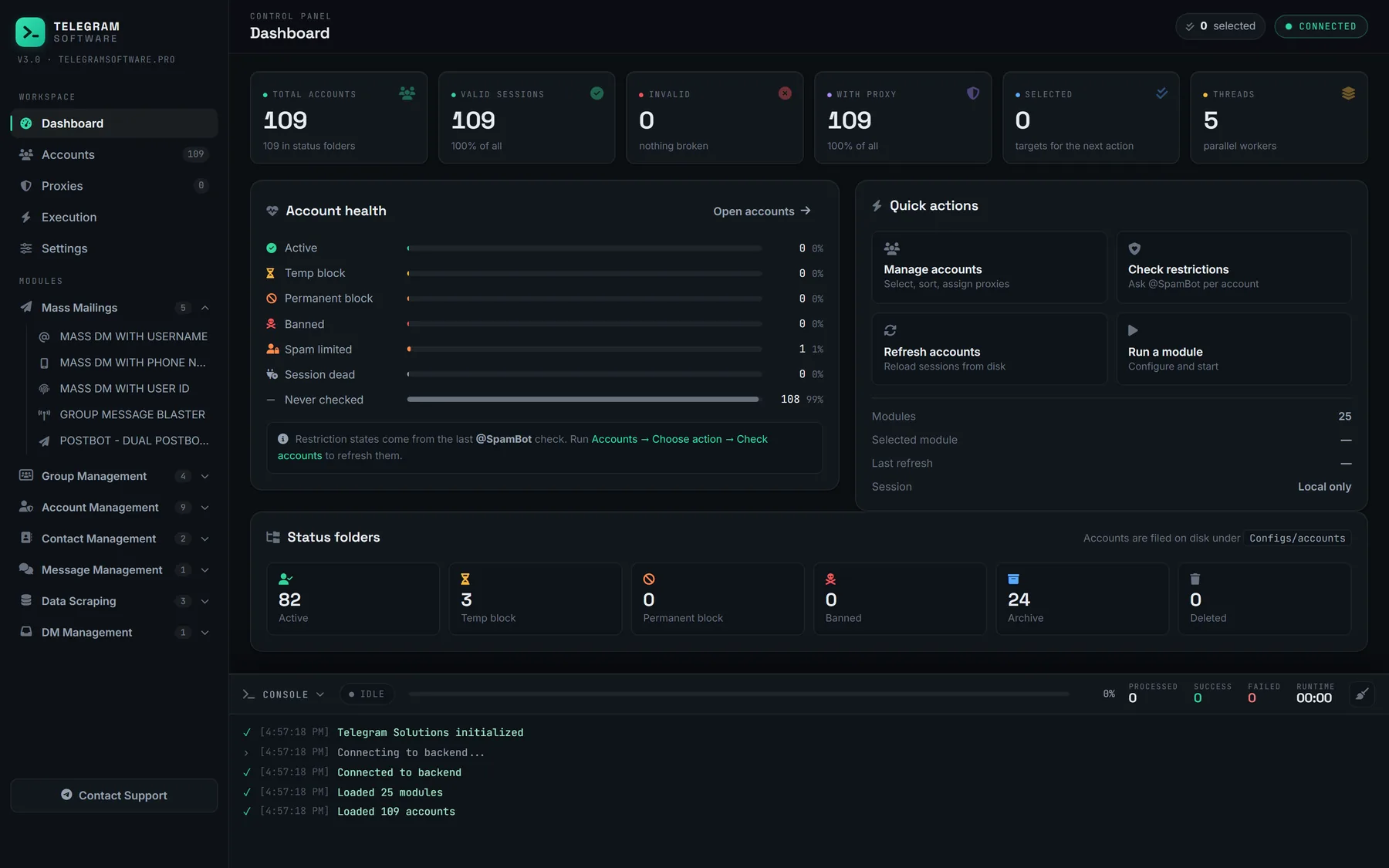
Past a few copies, a telegram multi account manager is the tidier tool, and the job changes from finding slots to keeping sessions apart. Ours loads Session + JSON and TDATA accounts into one table, gives each session its own proxy, and comes with one licence and no session cap. It signs in as your accounts over MTProto, the account side of Telegram software rather than the bot side, and Check Accounts marks which sessions still answer. Each row carries the phone, username, app version, assigned module, last seen, proxy and restriction status, so an account that has gone quiet or picked up a restriction shows up before anything is pushed into a module.
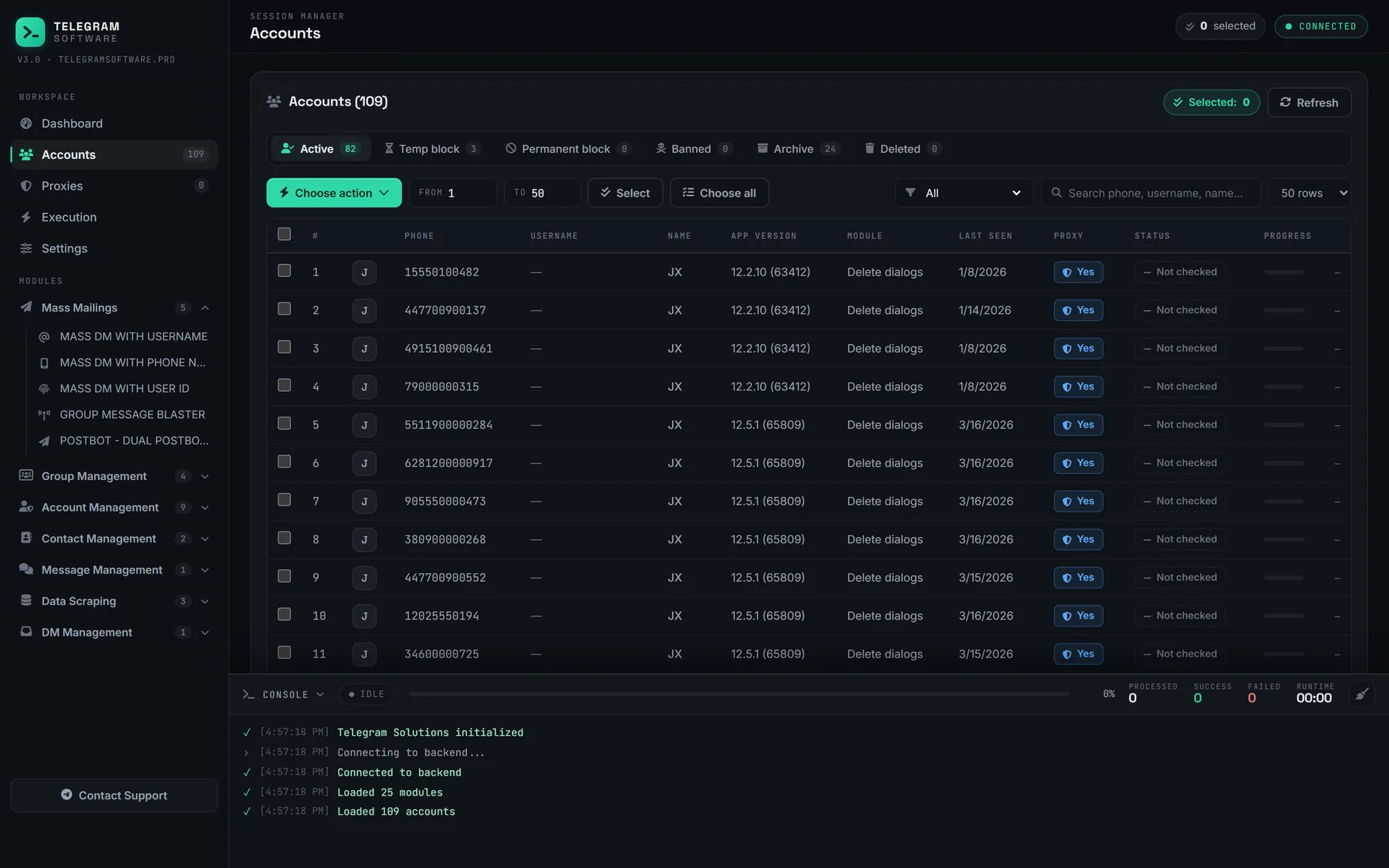
That is how to manage multiple telegram accounts without opening each one to read its messages. DM Hub forwards incoming messages from every session into one control group, and a reply written there goes back out from the account that received it, so the person on the other end hears back from the account they wrote to. The session files behind all this are live logins rather than copies of them, which is why they stay on your own machine.
Is running several Telegram accounts against the rules?
Not by count.
The Terms of Service set no number of accounts; they rule out spam, scams and illegal content, whichever account sends it. The API side is stricter. Telegram's page on obtaining an api_id says accounts that log in through unofficial clients are put under observation automatically, and that flooding or spamming through the API gets an account banned forever. Every session manager is such a client, ours included, and each one signs in under an api_id tied to one developer number. What moves an account towards that line is behaviour rather than headcount: unsolicited messages sent from ten accounts are ten accounts collecting reports.
So the panel's limits are plain. It does not supply numbers, accounts or proxies, does not raise any limit Telegram applies to an account, and does not hide from Telegram which client an account signed in through.